On Page SEO Checklist: Complete Guide to Optimize Your Website For Google
In this article, we will share a complete and easy-to-follow on page SEO checklist that businesses, bloggers, ecommerce, and service-based companies can use to improve their website’s visibility.
What is On Page SEO?
On page SEO is the optimization work done on individual web pages. It is a set of best practices that can help your page to be relevant and easy to understand for search engines like Google.
It includes SEO elements such as
• page titles
• meta-descriptions
• headings
• content optimization
• keywords
• URLs
• images
• page speed
• mobile responsiveness
• structured data
• user experience
On page SEO helps Google to understand the context and theme of the web page so that it appears in the search results for the relevant queries.
Why is On page SEO important?
Google has to understand the context and theme of your web pages in order to rank them. With a good on page SEO optimization, you can increase your chances of ranking your pages for the right queries and improve your organic traffic, click-through rates, content relevance, user experience, and many more.
On page SEO is extremely important for business websites since all of their services or products may need a separate page with unique optimization.
On Page SEO Checklist
1. Choose one primary keyword
Every page needs one primary keyword. It is usually based on the topic of the page. For example, for an SEO service page, the primary keyword may be:
- SEO Services in Delhi
- While, for a blog article, it can be something like:
- On Page SEO Checklist
Ideally, it should reflect the content and target of the page. Avoid keyword stuffing in the text when it does not make sense and do not force your keyword somewhere when it does not match the topic of the page.
You can also use related keywords, phrases, and terms that are similar or variations of your primary keyword. Some variations can include:
• On page SEO guide
• On page optimization
• SEO checklist
• Website SEO checklist
• On page SEO techniques
2. Optimize your SEO title
Your SEO title is probably the most important element of on page SEO optimization. It appears as the first impression in the search results. A good SEO title should have your primary keyword, explain the contents of the page, be easy to read and understand, and encourage the click-through rate. Avoid keyword stuffing as it will look spammy and Google will penalize your page.
For example,
we can use the following title for this article:
On Page SEO Checklist: Complete Guide for Better Rankings
instead of
SEO On Page SEO Checklist SEO Optimization Guide
3. Write a compelling meta-description
The meta-description is a short summary of what the page is about. Although it is not a ranking factor, it can improve your CTR if it is compelling enough. For example:
Follow this complete On Page SEO Checklist to optimize your title, content, headings, URLs, images, internal links, page speed and more for better Google rankings.
4. Write a clean URL
Make sure that your URL is easy to read and does not have any junk strings or parameters. For example, use
/blog/on-page-seo-checklist
instead of
/blog/page?id=983745&category=seo123
5. Write one clear H1 heading
The H1 is the main heading of the page and it should clearly explain what your page is about. Ideally, it should be similar to your SEO title but it does not have to be the same. For this article, the H1 can be:
On Page SEO Checklist: Complete Guide to Optimize Your Website
Avoid multiple unrelated H1s on one page.
6. Use H2 and H3 headings
Using H2 and H3 headings will make your content scannable and easy to read. In general, H1 is the main heading of the page, H2 is the subheading, and H3 is the sub-subheading. For example:
- On Page SEO Checklist
- Optimize Your Page Title
- Improve Your Content
- Optimize Images
- Use Descriptive Alt Text
- Compress Images
This way, the users will not have to read the entire article to find the information that they need, and Google will better understand what your page is about.
7. Add your keyword in multiple places
Make sure that your primary keyword appears in the following places:
• SEO title
• H1
• Introduction
• Some subheadings (H2)
• Content
• URL
• Meta description
• Alt text (if relevant)
Try not to repeat the same exact keyword too many times. Although, keywords are still important, people tend to write better articles when they are not obsessed with keyword density. Modern SEO is much more about relevance than keywords.
8. Write helpful and informative content
Content is the most important part of any on page SEO optimization. Your content has to be relevant and answer the main questions or solve a problem that the users are looking for. For example, when someone Googles On Page SEO Checklist, he/she is looking for optimization tips, not a generic article. That is why it is so important to provide helpful and informative content. Your page should have:
• clear answers
• be precise
• be easy to read and understand
• have good examples
• avoid fluff and meaningless text
• be original
• relevant to the search intent
There is no specific word count for any page, but you should always write enough to fully respond to a search query.
9. Optimize the introduction
The introduction paragraph is a must-have on any page. Avoid long introductions and get straight to the point. Your introduction paragraph should briefly explain what the page is about. For example:
If you want to improve your website rankings, this On Page SEO Checklist covers the key elements that you should optimize including titles, headings, content, URLs, images, internal links and page performance.
10. Add internal links
Internal links are links from one page on your website to another relevant page. For example, on a digital marketing company website, you can add internal links from an On page SEO article to the following pages:
• SEO Services
• Website Designing
• Technical SEO
• Content Marketing
• Website Development
• Google Ads
Internal links help search engines to better understand the context of the page, and they can also help users to find more relevant information.
Use descriptive anchor texts for your internal links. For example:
Learn more about our SEO services
instead of
click here
11. Add external links (when relevant)
External links are links from your page to a page on another website. External links are useful when you want to provide additional information or resources to your users. For example, when writing SEO-related articles, you can add external links to Google Search Central blogs or documentation.
Avoid adding random external links when they do not provide any value for your users.
12. Optimize your images
Images can make your website look more attractive and engaging. But, if the images are not optimized, they can hurt your page speed and SEO performance. Always make sure that the image file names, URLs, sizes, alt text, and dimensions are properly optimized.
Avoid long file names like:
- IMG_83746.jpg
- And use something short and descriptive like:
- on-page-seo-checklist.webp
- Add relevant and descriptive alt text to your images:
- On Page SEO checklist showing important website optimization elements
Do not add random keywords in the alt text. Describe the image and the context that it provides.
13. Optimize your page speed
Page speed is crucial for a good user experience. Nobody likes slow websites and Google will penalize slow sites. That is why it is extremely important to make sure that your website is fast and responsive. There are several factors that can affect the speed of a website, such as:
• Large images
• Too many scripts
• Poor hosting
• Unoptimized CSS and JavaScript
• Too many plugins
• Heavy fonts
• Heavy animations
The best way to optimize the page speed is to compress images, optimize CSS and JavaScript, reduce the number of plugins, and choose a good hosting plan.
14. Make your web page mobile-friendly
More than 50% of Google searches are on mobile devices. That means that you need to make sure that your website looks good and functions properly on mobile devices. Check the following:
• Font size and readability
• Navigation menu
• Buttons and CTA
• Forms
• Images
• Tables
• Pop-up windows
• Content spacing
Users should not have a hard time reading the text on a small screen. Avoid small font sizes and make sure that the paragraphs are not too long.
15. Optimize for search intent
Search intent is basically a user’s search query intent. A user can be looking for a definition, an in-depth guide, a list of products, or a local service provider. For example,
“What is On Page SEO?” – the user is looking for a definition
“On Page SEO Checklist” – the user is looking for optimization guides
“SEO company in Delhi” – the user is looking for local SEO services
Your content has to be optimized for the right search intent. Even if the search query has high volume and is easy to rank for, it will not get you traffic if the content is not relevant.
16. Add relevant FAQs
Frequently asked questions are a great way to optimize your pages. The questions can be about your products/services, the process, the team, testimonials, and anything else that your potential customers may be interested in. For example, for an On page SEO article, the FAQs can be:
What is the most important On Page SEO factor?
There is no magic factor for higher rankings. Having relevant content, clear page structure, optimized titles, internal linking, page performance, and user experience, are some of the most important on page SEO factors.
How often should On Page SEO be updated?
Important pages should be updated regularly to keep the information fresh and relevant. Pages with high competition should be reviewed and optimized periodically.
Is keyword density important?
There is no magic percentage for keyword density. Avoid keyword stuffing and write your content in a natural and easy-to-read manner. Search engines care about relevance more than density.
Does On Page SEO include backlinks?
Backlinks are a part of off-page SEO. On page SEO focuses on optimizing elements inside your domain.
17. Avoid duplicate content
Always make sure that the content on your web pages is unique. Avoid using the same text for multiple web pages since it will look spammy and Google will penalize your site.
For example, do not create hundreds of location pages with the same paragraph but with a slightly changed city name. If you want to create location-based pages, make sure that the content is different and relevant for the specific area.
18. Optimize Calls to Action (CTAs)
SEO drives traffic to your website, but you also need to optimize your pages so that users can take the right action. CTAs can be different for every page, but the most common CTAs for business websites include:
- Request a quote
- Contact now
- Book a consultation
- Call now
- Explore our services
- View portfolio
- Get an SEO audit
Avoid overusing CTAs and make sure that they are relevant and noticeable.
19. Add schema markup (when relevant)
Schema markup is a type of structured data that helps Google to better understand the context of a page. For example, you can use schema markup to define:
• Organization
• LocalBusiness
• Breadcrumb
• Articles
• Product
• Service
• FAQs (when relevant)
Schema markup is not a ranking factor, but it can help Google to display your page in a rich snippet. Only use schema markup if the structured data is relevant and can be seen by the users.
20. Check canonical tags
Canonical tags help Google to understand which URL is the official one when there are multiple similar URLs. A lot of websites make a mistake with the canonical tags and they end up losing important traffic. It is a very technical part of SEO, but the most common issues are with:
• Ecommerce filters
• URL parameters
• Duplicate category/product pages
• HTTP/HTTPS
• WWW/non-WWW
21. Check indexability
Indexability means that your page can be indexed by Google and appear in the search results. Before optimizing any ranking factors, make sure that the page is indexable. Double-check that the page does not have any accidental noindex tags or robots.txt disallow directives. Check that your page has a proper 200 status code, valid canonical, internal linking, and appears in your XML sitemap (when relevant).
22. Optimize user experience
User experience (UX) and SEO go hand in hand. Google will always prioritize user experience and penalize websites that do not follow the best practices. A good user experience is achieved through:
• Clear and easy-to-find information
• Easy navigation
• Proper spacing
• Useful images and videos
• Descriptive headings
• Short paragraphs
• Readable fonts
• Avoid pop-ups
23. Keep updating your content
SEO is an ongoing process and old content may not perform as well over time. That is why it is important to update your content regularly. It is a good idea to update your content every 6-12 months. You should also update the content if:
• The information has changed
• There are broken links
• The optimization was not sufficient
• Your competitors are outranking you
• The algorithm update has occurred
• The search intent has changed
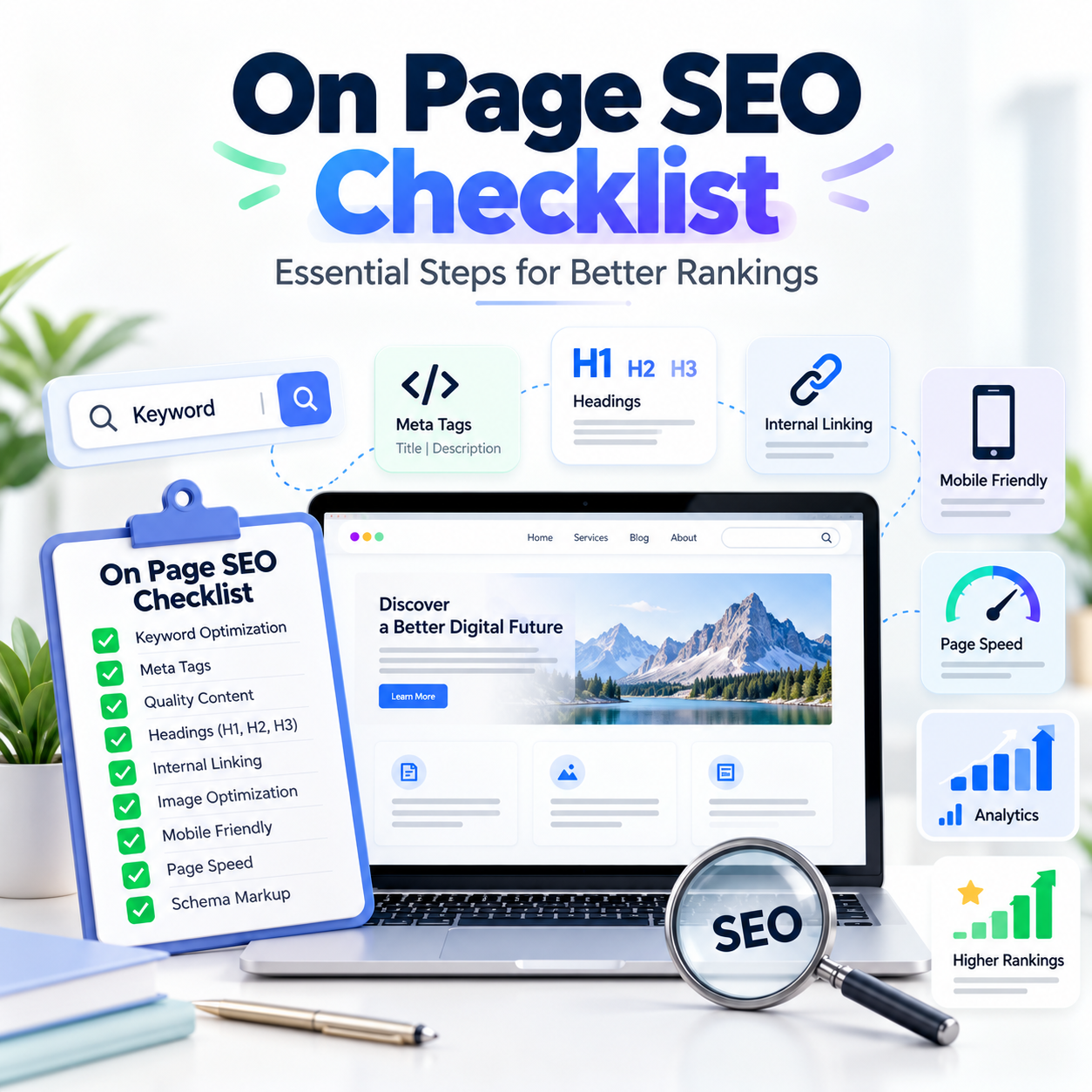
Quick On page SEO checklist
Before publishing or updating any important page, double-check the following:
-
Selected the right primary keyword
- Optimized for the right search intent
- Optimized the SEO title
Written a compelling meta description
-
Created a clean URL
- Used one clear H1
- Added H2 and H3 subheadings
- Included a helpful and informative content
- Used the keyword in relevant places
- Optimized images (file name, alt text, compression)
- Included internal links
- Added external links (when relevant)
- Made the page mobile-friendly
- Optimized the page speed
- Included a CTA
- Checked the canonical tag
- Made sure that the page is indexable
- Added schema markup (when relevant)
- Proofread the page for grammar and spelling errors
- Common On page SEO mistakes to avoid
Avoid the following on page SEO mistakes:
-
Keyword stuffing
- Duplicate page titles
- Missing H1 headings
- Thin content
- Scraping the content from other websites
- Large images
- Broken internal links
- Poor mobile optimization
- Writing for search engines
- Wrong search intent
- Duplicate pages with the same keywords
- Generic anchor text
- Publishing unindexable pages
Clean On page SEO always outperforms any attempt to trick search engines and manipulate the ranking factors. Focus on providing value for your users and optimize your website according to best practices.
On page SEO for business websites
Businesses should always optimize their service pages. Every important service should have its own optimized page. For example, for a digital marketing agency, the following service pages may need to be optimized:
- Website Designing
- Website Development
- Ecommerce Development
- Search Engine Optimization
- Google Ads
- Meta Ads
- Social Media Marketing
- Lead Generation
Every service page should be optimized for the right keywords and provide value for the users. It should also have clear CTAs so that the potential customers can contact the business.
On page SEO with GrowthWeb Digital
On page SEO is a critical component of a successful SEO strategy. At GrowthWeb Digital, we believe that every website should be built with SEO in mind. Search engines love websites with clean titles, optimized content structure, internal linking, mobile responsiveness, fast page speed, technical optimization, and great UX. Having said that, a professional on page SEO checklist can help you build a better website that is easy to navigate and rank higher in the search results.
Conclusion
On page SEO plays a significant role in your overall SEO strategy. Instead of focusing only on the keywords, always optimize the entire page. Some of the most important factors for a well-optimized page include:
Relevant and informative content + clear structure + optimized metadata + external and internal linking + fast speed + mobile-optimized design + great user experience
Remember to use the On page SEO checklist when you are publishing or updating any important page. It will help you to continuously improve your website’s SEO performance and user-friendliness. If you are looking for professional website development, SEO, digital marketing, and online growth services, GrowthWeb Digital is here to help.